
GoSkills keeps track of your organization’s AI usage. Free plans, including trials, come with a set number of AI credits, while paid plans can continue using AI features without limits.
Here’s how AI credits work, which features use them, and what happens when a free plan runs out.
Who AI credits apply to
How AI credits work depends on your GoSkills plan:
- Free plans and trials: Include $25 of AI credits. This is a one-time allowance and does not reset each month. When the credits run out, AI features that use credits are unavailable until the plan is upgraded or more credits are added by the GoSkills team.
- Paid plans: AI usage is recorded, but there is no usage limit. AI features are not blocked, and you won’t see a credits meter.
- Individual users without an organization: AI usage is not limited, and credits are not charged.
What uses AI credits?
The following AI features use your organization’s credits.
1. Genie chats
Every message you send to Genie in the course editor uses credits.
The amount used depends on factors such as:
- The length of the conversation.
- The AI model you choose.
- The work Genie needs to do to answer, such as reading a web page or searching through your knowledge files.
Images generated by Genie during a chat also use credits.
2. Course descriptions and parameters
Generating a course description or course parameters with Genie in the course editor also uses credits.
3. Knowledge files
Uploading a knowledge file for Genie to use requires the file to be read and indexed. This processing uses credits once, when the file is uploaded.
Files uploaded before the introduction of AI credits are not charged again.
4. Scenario generation
Using AI to generate a scenario block in the course editor uses credits.
5. Scenario practice
Practicing an AI scenario uses your organization’s credits.
For text scenarios, credits are used for the opening line, each reply, and the evaluation at the end of the session. Voice conversations also use credits.
Testing a scenario from the course editor using Try it out uses credits in the same way as learner practice.
Voice practice uses the most credits, as audio costs several times more than text.
What doesn’t use AI credits?
These AI features are free to use and are never blocked because of your organization’s credit balance:
- AI Tutor inside courses
- Course recommendations
- AI-powered search
How to check your remaining AI credits
If you’re on a free plan or trial, you can check your remaining credits directly in Genie.
Open Genie in the course editor and look underneath the message box. You’ll see a thin Free AI credits meter showing the percentage of credits remaining, such as 73% left.
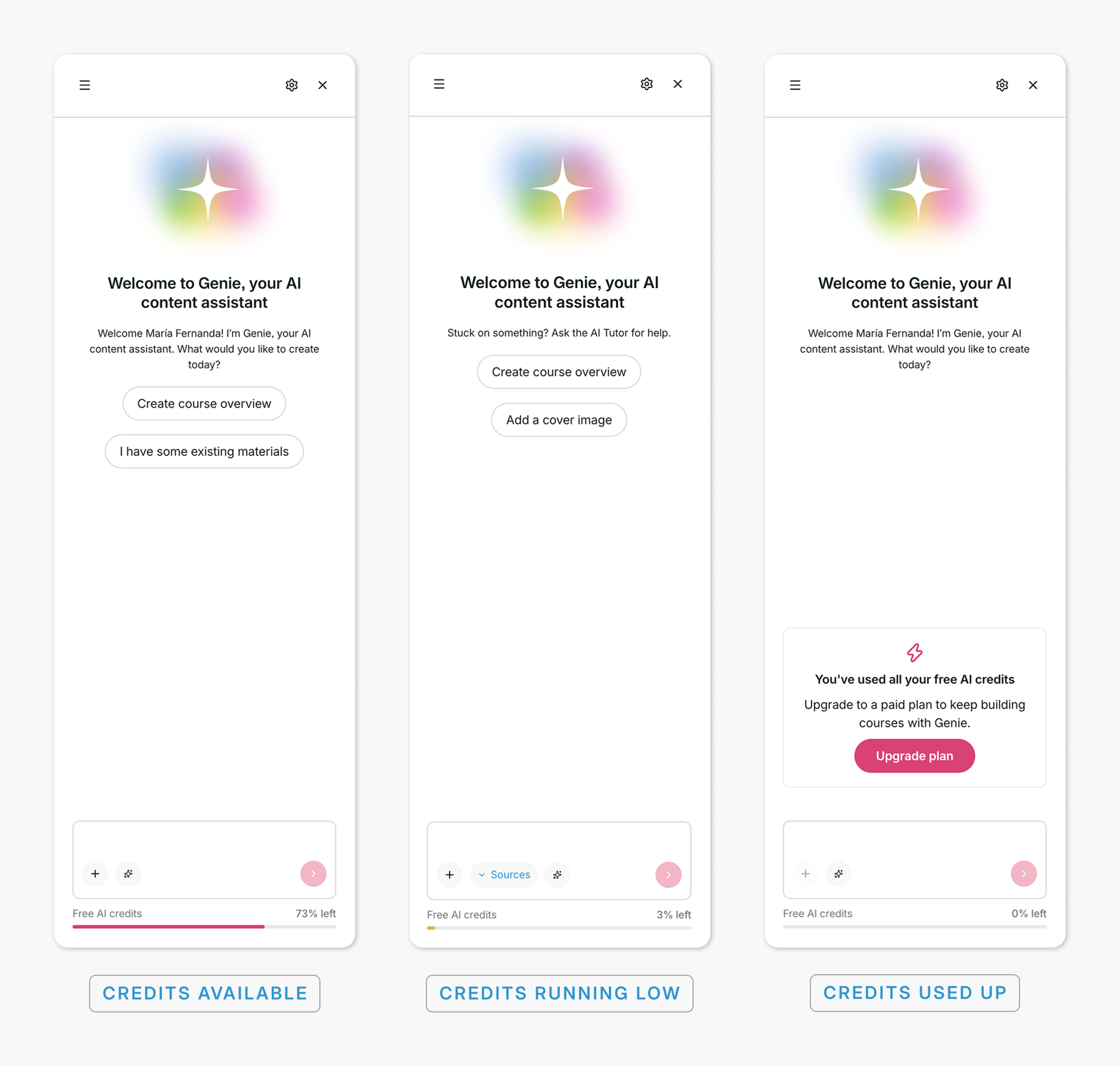
A few things to know:
- The meter turns orange when 20% or less remains.
- Your balance is shown as a percentage rather than a dollar amount.
- The meter updates after every Genie answer.
Paid plans do not see an AI credits meter.
What happens when a free plan runs out of credits?
Once a free plan has used all of its AI credits, features that require credits are blocked until the plan is upgraded or more credits are added.
The last Genie answer before the credits run out is allowed to finish, so the balance can dip slightly below zero.
Here’s what you can expect across different features.
1. Genie
When your organization runs out of credits:
- A message appears above the message box saying “You’ve used all your free AI credits.”
- Account admins see an Upgrade plan button. Other users are asked to contact their account admin.
- The send button is disabled and the credits meter shows 0%.
- If a long Genie answer is stopped because the credits run out, it is marked “Stopped: out of AI credits.” Anything Genie has already written is kept.
- You can still open Genie and read previous conversations.
- Knowledge file uploads are disabled. Hovering over the upload button explains why.
2. Scenario blocks in the course editor
AI generation options are replaced by an out-of-credits notice.
You can still create the scenario manually, but AI generation and Try it out are unavailable.
3. Scenario practice for learners
Learners cannot start a new AI scenario practice session once the organization is out of credits.
If credits run out during an active session:
- A text session stops at the next reply.
- A voice session ends and explains that the organization has used all of its AI credits.
- If the evaluation at the end of a session cannot run, the practice session is still saved. It can be evaluated after the plan is upgraded.
4. Course descriptions and parameters
Generating course descriptions or course parameters with Genie is unavailable while the organization is out of credits.
How to get more AI credits
There are two ways to restore access to AI features that use credits:
- Upgrade to a paid plan: Paid plans are not limited, so the block is lifted immediately after upgrading.
- Contact GoSkills support: In special cases, such as an extended trial, the GoSkills team may add credits to a free plan. Reach out to support@goskills.com, and our team will be happy to help.
There is currently no option to purchase additional credits for a free plan.
Tips to make your AI credits last longer
A few small changes can help you use your free credits more efficiently:
- Choose a lower-cost model: Different AI models use credits at different rates. Gemini 3.7 Flash costs significantly less than the other available models.
- Start a new chat when you change topics: Each Genie message includes the earlier conversation, so longer conversations generally cost more per message.
- Upload only the knowledge files you need: Each file uses credits when it is uploaded, and larger PDFs with more pages cost more to process.
- Use voice practice with care: Voice is the most expensive AI feature. Text-based scenario practice costs much less.
- Stop answers you no longer need: If you stop Genie while it is answering, you’re still charged for what has already been generated, but not for anything after you stop it.
Choosing an AI model in Genie
Genie currently offers five AI models. GoSkills selects a default model, but you can change it for each conversation using the model picker next to the message box.
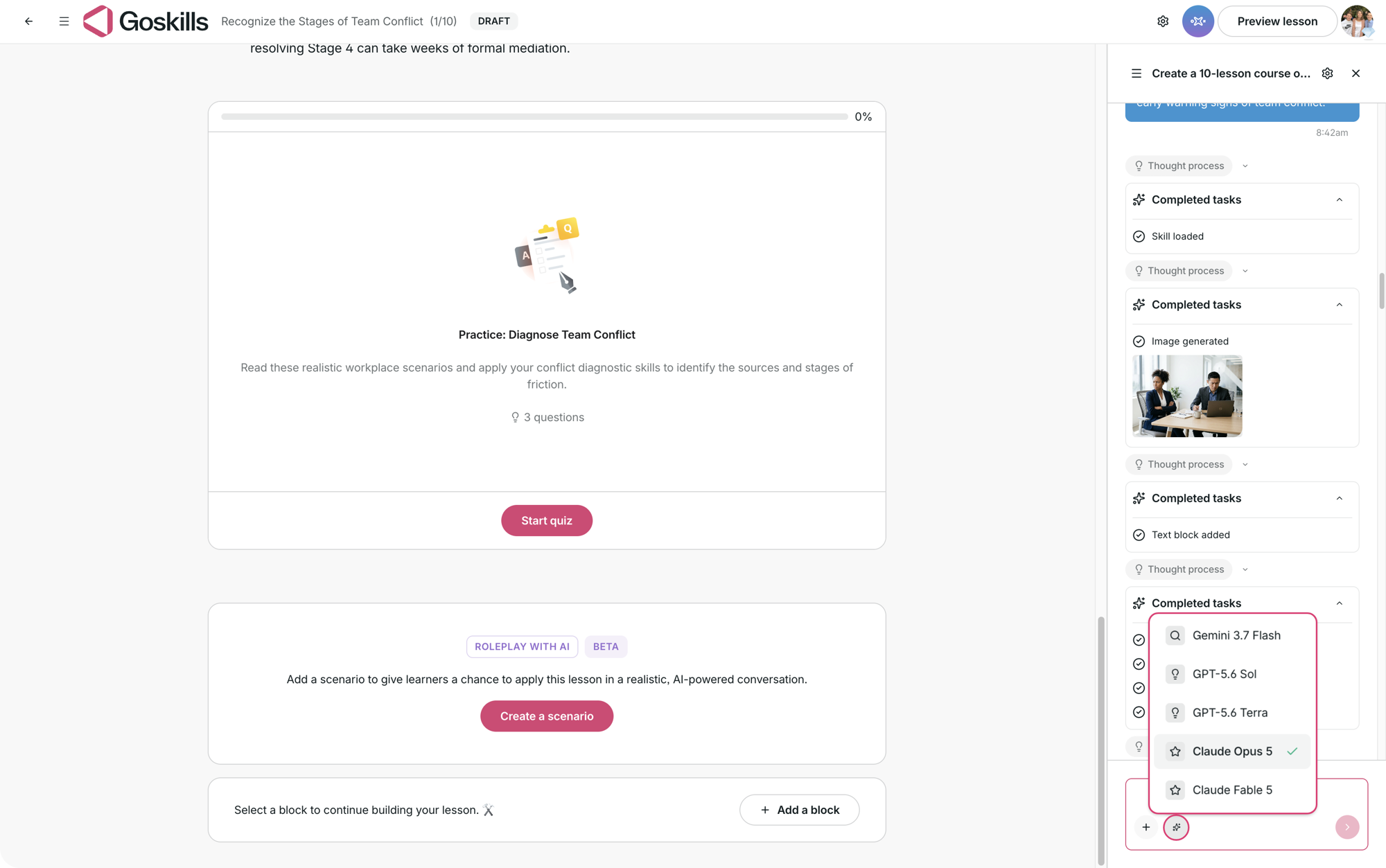
From lowest to highest relative cost:
- Gemini 3.7 Flash: Lowest cost.
- GPT-5.6 Terra: Around 3 times the cost of Gemini 3.7 Flash.
- Claude Opus 5: Around 7 times the cost.
- GPT-5.6 Sol: Around 8 times the cost.
- Claude Fable 5: Around 13 times the cost.
Genie remembers the model you select for that conversation.
These figures are approximate. The actual amount of credits used depends on factors such as the length of the conversation and the work Genie performs to answer.
Still have questions about AI credits?
We’re happy to help! Reach out to us at support@goskills.com, and our team will be in touch.